内建命令和标志
provided by cmdr
内建命令与支持
截至 cmdr v2.1.1,我们提供如下的内建命令和标志。
其中部分命令的具体实现暂未提上日程,如果你重度依赖这些功能,请使用 cmdr v1 并在 Discuss 留下 Requests。
当前我们的重心在于基于 Redesign Archi 的基础尽可能地保持核心代码的工作方式并尽快冻结 API。既然这些暂缓的功能并非 CLI app 的必需品,那么我们暂时押后是有理由的。
Commands
generatemanualdoc(NOT-YET)shell
sbomversionhelp
help Command
help 命令类似于 --help 标志。
DONE: 我们有计划在这里制作一个问答子系统。[部分已实现]
请参考下一节:Help Subsystem
version Command
version 主要提供版本号以及构建信息。
在产品发布的构建脚本中,你应该遵循 产品发布 所提到的要点,为可执行文件写入构建预设值,才能保证 version 输出的信息有效和有意义。
参阅 --version
$ ./bin/blueprint --version
v2.1.1
blueprint
2025-03-18T11:17:45Z
e936495
go version go1.23.7 darwin/arm64
v1.3.0-dirty


$ ./bin/blueprint -V
v2.1.1
$两种形式提供的信息的详尽程度略有不同。
注意,app version/app versions 命令 和 app --version 标志的功能是等价的。
sbom Command
以 YAML 格式打印标准的 Golang SBOM 信息。
$ ./bin/blueprint sbom
SBOM:
  executable: "~work/godev/cmdr.v2/cmdr.tests/bin/blueprint"
  go-version: go1.23.7
  path: github.com/hedzr/cmdr-tests/examples/blueprint
  module-path: github.com/hedzr/cmdr-tests
  module-version: (devel)
  module-sum:
  module-replace: <ignored>
  settings:
    - "-buildmode": exe
    - "-compiler": gc
    - "-ldflags": -s -w     -X 'github.com/hedzr/cmdr/v2/conf.Githash=e936495'     -X 'github.com/hedzr/cmdr/v2/conf.GitSummary=v1.3.0-dirty'     -X 'github.com/hedzr/cmdr/v2/conf.GitDesc=e936495 bump to v1.3.0'     -X 'github.com/hedzr/cmdr/v2/conf.BuilderComments='     -X 'github.com/hedzr/cmdr/v2/conf.GoVersion=go version go1.23.7 darwin/arm64'     -X 'github.com/hedzr/cmdr/v2/conf.Version='     -X 'github.com/hedzr/cmdr/v2/conf.AppName='     -X 'github.com/hedzr/cmdr/v2/conf.Buildstamp=2025-03-18T11:40:29Z'
    - "CGO_ENABLED": 1
    - "CGO_CFLAGS":
    - "CGO_CPPFLAGS":
    - "CGO_CXXFLAGS":
    - "CGO_LDFLAGS":
    - "GOARCH": arm64
    - "GOOS": darwin
    - "GOARM64": v8.0
    - "vcs": git
    - "vcs.revision": e936495ce05ed3d1a4473ca2dc93c6184abb4fe1
    - "vcs.time": 2025-03-13T03:26:11Z
    - "vcs.modified": true
  depends:
    - debug-module: { path: "github.com/fsnotify/fsnotify", version: "v1.8.0", sum: "h1:dAwr6QBTBZIkG8roQaJjGof0pp0EeF+tNV7YBP3F/8M=", replace: (*debug.Module)(nil) }
    - debug-module: { path: "github.com/hashicorp/hcl", version: "v1.0.0", sum: "h1:0Anlzjpi4vEasTeNFn2mLJgTSwt0+6sfsiTG8qcWGx4=", replace: (*debug.Module)(nil) }
    - debug-module: { path: "github.com/hedzr/cmdr-loaders", version: "(devel)", sum: "", replace: (*debug.Module)(nil) }
    - debug-module: { path: "github.com/hedzr/cmdr/v2", version: "(devel)", sum: "", replace: (*debug.Module)(nil) }
    - debug-module: { path: "github.com/hedzr/evendeep", version: "(devel)", sum: "", replace: (*debug.Module)(nil) }
    - debug-module: { path: "github.com/hedzr/is", version: "(devel)", sum: "", replace: (*debug.Module)(nil) }
    - debug-module: { path: "github.com/hedzr/logg", version: "(devel)", sum: "", replace: (*debug.Module)(nil) }
    - debug-module: { path: "github.com/hedzr/store", version: "(devel)", sum: "", replace: (*debug.Module)(nil) }
    - debug-module: { path: "github.com/hedzr/store/codecs/hcl", version: "v1.3.2", sum: "h1:OWfhelBbDANxGqBV6wH4c6tIJ37VgN2hewqhaAnh+iU=", replace: (*debug.Module)(nil) }
    - debug-module: { path: "github.com/hedzr/store/codecs/hjson", version: "v1.3.2", sum: "h1:rCHg5rVsI7LF9h4H9q6VPQnt5mu2+g6TvbCTtpUMBdY=", replace: (*debug.Module)(nil) }
    - debug-module: { path: "github.com/hedzr/store/codecs/json", version: "v1.3.2", sum: "h1:jIN4mICShavdyyyPuqtw+491VDJWseUkwr0MdHqfJxU=", replace: (*debug.Module)(nil) }
    - debug-module: { path: "github.com/hedzr/store/codecs/nestext", version: "v1.3.2", sum: "h1:DFV96BIWiy7wBbWzer4aPG7xWd/JcPzRKe27yjWbWH8=", replace: (*debug.Module)(nil) }
    - debug-module: { path: "github.com/hedzr/store/codecs/toml", version: "v1.3.2", sum: "h1:mC9FOXUlLK2xThbS7rkX7rFW61Q0U1VHLPRWUTD2XlM=", replace: (*debug.Module)(nil) }
    - debug-module: { path: "github.com/hedzr/store/codecs/yaml", version: "v1.3.2", sum: "h1:v6AFIB8VjzGunXW3FPBkCVT5KIPhC6svU/kV5GdzbEQ=", replace: (*debug.Module)(nil) }
    - debug-module: { path: "github.com/hedzr/store/providers/env", version: "v1.3.2", sum: "h1:UfUj22yFEAO245yCNIDdTUxvVR9NIavjjHf5xsXZAKU=", replace: (*debug.Module)(nil) }
    - debug-module: { path: "github.com/hedzr/store/providers/file", version: "v1.3.2", sum: "h1:j2ls+yN5ccGpOfKVEfT6HZZN4gQ3cbJe/vXla5ZaWXc=", replace: (*debug.Module)(nil) }
    - debug-module: { path: "github.com/hjson/hjson-go/v4", version: "v4.4.0", sum: "h1:D/NPvqOCH6/eisTb5/ztuIS8GUvmpHaLOcNk1Bjr298=", replace: (*debug.Module)(nil) }
    - debug-module: { path: "github.com/npillmayer/nestext", version: "v0.1.3", sum: "h1:2dkbzJ5xMcyJW5b8wwrX+nnRNvf/Nn1KwGhIauGyE2E=", replace: (*debug.Module)(nil) }
    - debug-module: { path: "github.com/pelletier/go-toml/v2", version: "v2.2.3", sum: "h1:YmeHyLY8mFWbdkNWwpr+qIL2bEqT0o95WSdkNHvL12M=", replace: (*debug.Module)(nil) }
    - debug-module: { path: "golang.org/x/crypto", version: "v0.36.0", sum: "h1:AnAEvhDddvBdpY+uR+MyHmuZzzNqXSe/GvuDeob5L34=", replace: (*debug.Module)(nil) }
    - debug-module: { path: "golang.org/x/exp", version: "v0.0.0-20250305212735-054e65f0b394", sum: "h1:nDVHiLt8aIbd/VzvPWN6kSOPE7+F/fNFDSXLVYkE/Iw=", replace: (*debug.Module)(nil) }
    - debug-module: { path: "golang.org/x/net", version: "v0.37.0", sum: "h1:1zLorHbz+LYj7MQlSf1+2tPIIgibq2eL5xkrGk6f+2c=", replace: (*debug.Module)(nil) }
    - debug-module: { path: "golang.org/x/sys", version: "v0.31.0", sum: "h1:ioabZlmFYtWhL+TRYpcnNlLwhyxaM9kWTDEmfnprqik=", replace: (*debug.Module)(nil) }
    - debug-module: { path: "golang.org/x/term", version: "v0.30.0", sum: "h1:PQ39fJZ+mfadBm0y5WlL4vlM7Sx1Hgf13sMIY2+QS9Y=", replace: (*debug.Module)(nil) }
    - debug-module: { path: "gopkg.in/hedzr/errors.v3", version: "v3.3.5", sum: "h1:bF4ijq4PAjwjCB8s7nWf2cjqo/yp6afNuQMC2SnX7t8=", replace: (*debug.Module)(nil) }
- debug-module: { path: "gopkg.in/yaml.v3", version: "v3.0.1", sum: "h1:fxVm/GzAzEWqLHuvctI91KS9hhNmmWOoWu0XTYJS7CA=", replace: (*debug.Module)(nil) }此信息可以被集成到供应链管理系统中。
generate Command
gen 命令的主要用途是生成 man 手册,以及生成自动完成脚本。
generate doc (NOT-YET)
在 cmdr.v1,这个命令主要用于生成 markdown 页面。
但在 cmdr.v2,它没有被实现。相应计划暂时不会提上日程。
generate man
为你的 app 的全部命令创建相应的 manpage 页面。例如对于 jump to 命令会生成名为 app-jump-to.man 的文件,此外,对于根命令来说,会生成 app.man 文件。
这些文件通常应该被部署到 man/man1/app/ 中,对于典型的 GNU-like 系统,Linux-like 系统,或者 Unix-like 系统来说,经常可能被部署到 MANPAGE 环境变量所指向的目录中。为了确认哪些文件夹被用于放置 manpages,你可以运行系统自带的命令 manpath 来获得信息:
$ manpath
/usr/local/man:/usr/local/share/man:/usr/share/man有的时候,也可以这样来确定:
$ whereis man
man: /usr/bin/man /usr/local/man /usr/share/man /usr/share/man/man1/man.1.gz /usr/share/man/man7/man.7.gz默认时,generate man 在当前文件夹中创建子目录 man1 来放置将要生成的 manpages,你可以稍后处理这些输出文件。一个实际运行的例子看起来像这样:
$ go build -o ./bin/ ./examples/blueprint/
$ ./bin/blueprint g m -a
# generating manpages (output-dir: ./man1, all: true) ...
#    writing to man1/blueprint.man...
#    writing to man1/blueprint-soundex.man...
#    writing to man1/blueprint-jump.man...
#    writing to man1/blueprint-jump-to.man...
#    writing to man1/blueprint-wrong.man...
#    writing to man1/blueprint-invoke.man...
#    writing to man1/blueprint-invoke-shell.man...
#    writing to man1/blueprint-invoke-proc.man...
#    writing to man1/blueprint-preset.man...
#    writing to man1/blueprint-preset-cmd.man...
#    writing to man1/blueprint-sbom.man...
#    writing to man1/blueprint-generate.man...
#    writing to man1/blueprint-generate-manual.man...
#    writing to man1/blueprint-generate-doc.man...
#    writing to man1/blueprint-generate-shell.man...
#    writing to man1/blueprint-version.man...
#    writing to man1/blueprint-help.man...
#    DONE.
$
Tip
对于终端用户来说,他们可以以 manpage 方式阅读和查看帮助屏:
app cmd --help --man--man 的目的是让 cmdr 将帮助屏以 manpage 格式方式直接输出给 man 命令。
尽管如此,在产品发布时部署全套的 man 1 pages 是开发者应尽的义务。因为只有这样,man 1 app 才能工作,同时用户也才能在 man 阅读系统中导航和查看更多的相关命令。
See also:
generate shell
cmdr.v2 和 v1 现在(v2.1.11)完成了 Shell 自动完成脚本的生成。
一般来说,你可以自动部署 自动完成脚本 到你的 zsh 环境:
$ ./bin/blueprint gen sh
...
# "/Users/hz/.oh-my-zsh/cache/completions/_blueprint" generated.
# Re-login to enable the new zsh completion script.但对于其他 Shell 环境来说,你可能需要手动部署生成的 自动完成脚本 文件到恰当的位置。
app generate shell 会自动检测下列 shell 环境,并试图为你完成大多数任务:
- zsh
- bash
- fish
- elvish (NOT YET)
- fig-shell (NOT YET)
- powershell
理论上,这些 shell 中的自动完成特性将被正确激活。但遗憾的是,我们没有对诸如 fish,powershell 等环境做充分的测试。
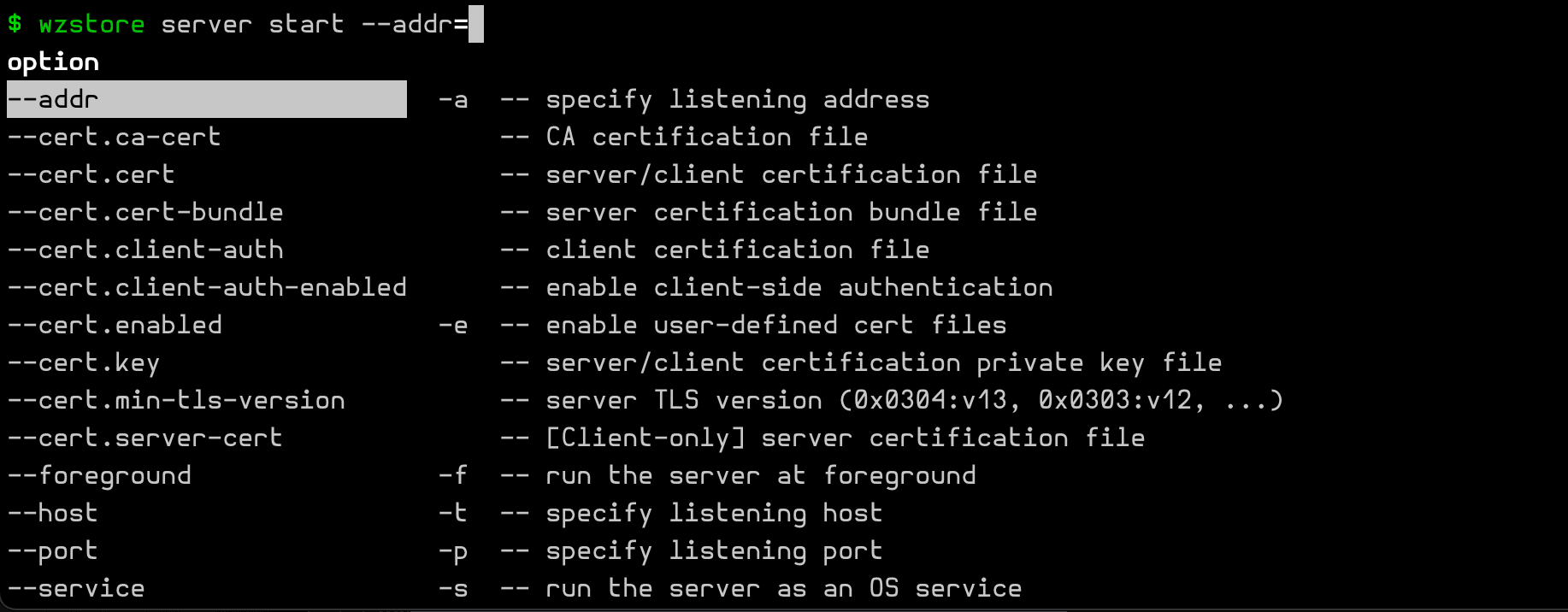
在 zsh 环境中,一个正在自动完成中的子命令选项如下图所示:
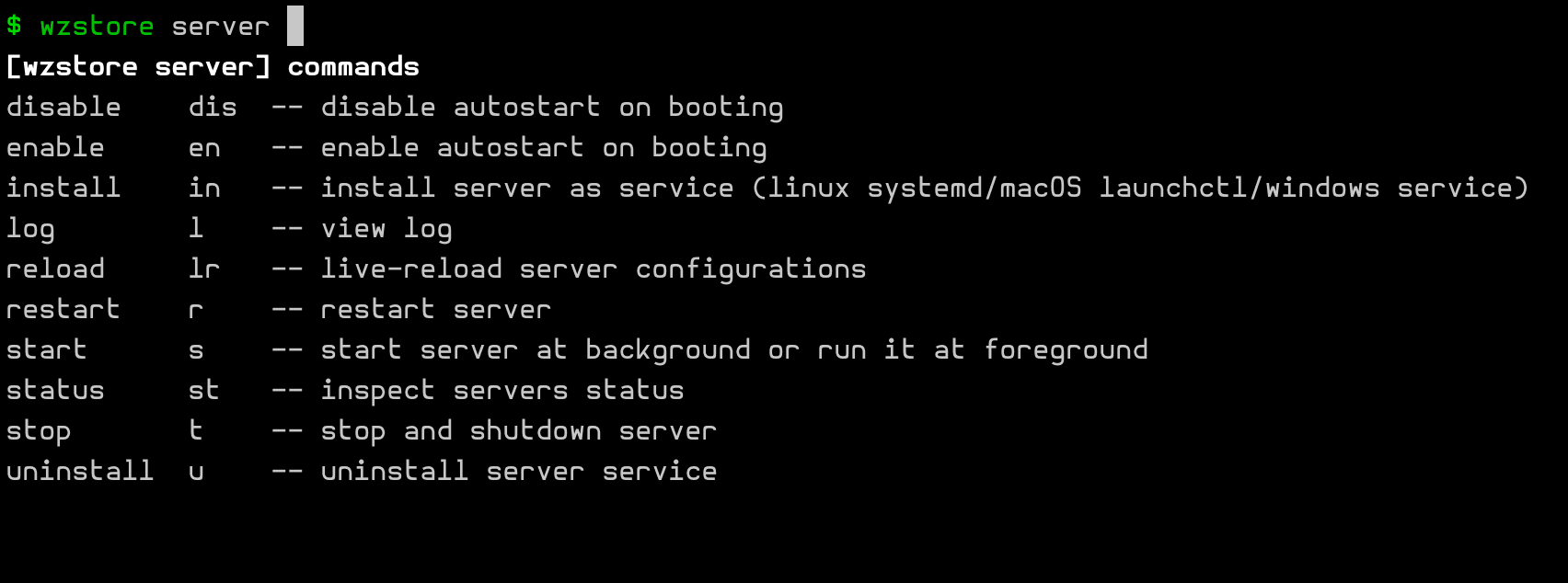
类似的,一个正在自动完成中的多级子命令如下图所示:
Flags
--help: 打印帮助屏--man: 打印帮助屏,但是以 manpage 方式--version: 打印版本号信息--build-info: 打印构建信息--version-sim: 临时修改呈现的版本号--strict-mode: STRICT Mode & level--no-color: No Color Mode & Level--quiet: Quiet Mode & Level--verbose: Verbose Mode & Level--debug: Debug Mode & Level--config=FILE提供一个主配置文件,略过内建搜索方案~~tree: 打印全部子命令(及其参数)~~debug: 打印用于调试的信息
其中,--man 为当前命令生成 man.1 手册并调用系统命令 man 来阅读它。
简要阐释
--version-sim 可用于替换在构建时固化的版本号,向外报告一个定制的临时版本号。
这个功能有时候有利于在预发布模式时模拟仿真多个版本号,有时候也可以用于做灰度测试或灰度发布。
四种模式:STRICT,NO-COLOR,QUIET 和 VERBOSE。
它们被抽象定义在 hedzr/is 的 Env 对象中,因此你需要对 Env 进行操作。
~~tree 以及 ~~tree -vvv 已经多次介绍过,它能为你呈现当前的子命令体系。
~~debug ~~env ... 主要用于打印调试目的的内部信息,包括内部 Store 的键值对。
FORCE_DEFAULT_ACTION=1 可以启用内建的 ActionDefault 命令,它也会打印用于调试目的的信息。
version
version 主要提供版本号以及构建信息。
在产品发布的构建脚本中,你应该遵循 产品发布 所提到的要点,为可执行文件写入构建预设值,才能保证 version 输出的信息有效和有意义。
$ ./bin/blueprint --version
v2.1.1
blueprint
2025-03-18T11:17:45Z
e936495
go version go1.23.7 darwin/arm64
v1.3.0-dirty


$ ./bin/blueprint -V
v2.1.1
$两种形式提供的信息的详尽程度略有不同。
build-info
--build-info/--built-info 主要提供版本号以及构建信息。
在产品发布的构建脚本中,你应该遵循 产品发布 所提到的要点,为可执行文件写入构建预设值,才能保证 version 输出的信息有效和有意义。
$ ./bin/blueprint --built-info
           Built by: go version go1.23.7 darwin/arm64
    Built Timestamp: 2025-03-18T11:17:45Z

         Git Commit: e936495
        Git Summary: v1.3.0-dirty
    Git Description: e936495 bump to v1.3.0
$ ./bin/blueprint -#
           Built by: go version go1.23.7 darwin/arm64
    Built Timestamp: 2025-03-18T11:17:45Z
$两种形式提供的信息的详尽程度略有不同。
Tree
The ~~tree flag has the leading double tilde characters ~~.
The optional -vvv can enable a verbose mode, in which the flags, the vendor-hidden items will be shown in list.
This flag can print the commands (and flags) with hierarchical tree mode.
$ go run ./examples/blueprint ~~tree -vvv
blueprint v2.1.1 ~ Copyright © 2025 by The Examples Authors ~ All Rights Reserved.
blueprint                                     a good blueprint for you.
  [Test]
    snd, soundex, sndx, sound                 soundex test
  [Misc]
    sbom,                                     Show SBOM Info
    g, generate, gen, generator               Generators for this app
      m, manual, man                          Generate Linux Manual Documentations
      -t, --type                              Linux man type (Default: 1)
          -number = --type=number
      [Output]
        -d, --dir=DIR                         The output directory (Default: DIR=)
      d, doc, docx, tex, pdf, markdown        Generate documentations
        -d, --dir=DIR                         The output directory (Default: DIR=)
      s, shell, sh, bash, zsh, fish, elvish, fig, powershell, ps                                        Generate the shell completion script or install it
        -d, --dir=DIR                         The output directory (Default: DIR=)
        -o, --output=FILE                     The output filename (Default: FILE=)
      [Shell]
        -a, --auto                            [x] Generate auto completion script to fit for your current env (Default: true)
        -z, --zsh                             [ ] Generate auto completion script for Zsh (Default: false)
        -b, --bash                            [ ] Generate auto completion script for Bash (Default: false)
        -f, --fish                            [ ] Generate auto completion script for Fish (Default: false)
        -p, --powershell                      [ ] Generate auto completion script for PowerShell (Default: false)
        -e, --elvish                          [ ] Generate auto completion script for Elvish [TODO] (Default: false)
        -f, --fig                             [ ] Generate auto completion script for fig-shell [TODO] (Default: false)
    ver, version, versions                    Show app versions information
    h, help, info, __completion, __complete   Show help system for commands
  [Misc]
        --strict-mode                         Strict mode for 'cmdr' [Env: STRICT] (Default: false)
        --no-env-overrides                    No env var overrides for 'cmdr' (Default: false) [Since: v0.1.1]
    -nc, --no-color                           No color output for 'cmdr' [Env: NO_COLOR,NOCOLOR] (Default: false)
    -v, --verbose                             Show more progress/debug info with verbose mode [Env: VERBOSE] (Default: true)
    -q, --quiet                               No more screen output [Env: QUIET,SILENT] (Default: false)
    -D, --debug                               Get into debug mode [Env: DEBUG] (Default: false)
    -DO, --debug-output                       Store the ~~debug outputs into file [Env: DEBUG_OUTPUT] (Default: )
        --env                                 Dump environment info in '~~debug' mode (Default: false)
        --more                                Dump more info in '~~debug' mode (Default: false)
        --raw                                 Dump the option value in raw mode (with golang data structure, without envvar expanding) [Env: RAW] (Default: false)
        --value-type                          Dump the option value type in '~~debug' mode (Default: false)
    -V, --version,--ver,--versions            Show app versions information (Default: false)
    -VS, --version-sim,--ver-sim              Simulate a faked version for this app (Default: )
    -#, --built-info,--bi,--build-info        Show the building information of this app (Default: false)
    -h, --help,--info,--usage                 Show this help screen (-?) [Env: HELP] (Default: false)
    -man, --manual                            Show help screen in manpage format (INSTALL NEEDED!) [Env: MAN] (Default: false)
        --tree                                Show help screen in manpage format (INSTALL NEEDED!) [Env: TREE] (Default: true)
        --config=FILE                         Load your config file [Env: CONFIG,CONF_FILE] (Default: FILE=)


Matched flags:
- 1. tree (+1) Flg{'.tree'} /TILDE/ | [owner: Cmd{''}]
- 2. v (+3) Flg{'.verbose'} /short/ | [owner: Cmd{''}]

ACTIONS:
- ShowTree

$
额外的话题
What is Next?
How is this guide?
最后更新于