介绍 cmdr
cmdr 是一个命令行参数处理框架,同时也提供应用程序设置集的集成能力
了解 cmdr
所以这里是 cmdr(-go) 的相关文档。
Cmdr(-go) v2 Documentation
Store Documentation
EvenDeep Documentation
Logg/slog Documentation
Is Documentation
Cmdr(-go) v1 Documentation
News about The Documentation and cmdr.v2
About Documentation
This documentation updated all of sample codes to v2.1.35.
Since cmdr v2.1.16, all examples/*.go are removed into examples/common/. It caused because some cycle imports could destory the relations while we are sharing some testing codes.
About cmdr.v2
See its CHANGELOG Here.
概况
用 Golang 编写一个使用 cmdr 软件包的微型 app,可以是这样,
package main

import (
	"context"

	"github.com/hedzr/cmdr/v2"
	"github.com/hedzr/cmdr/v2/cli"
)

func main() {
	app := cmdr.New().
		Info("tiny0-app", "0.3.1").
		Author("The Example Authors") // .Description(``).Header(``).Footer(``)
	app.Cmd("jump").
		Description("jump command").
		Examples(`jump example`). // {{.AppName}}, {{.AppVersion}}, {{.DadCommands}}, {{.Commands}}, ...
		OnAction(func(ctx context.Context, cmd cli.Cmd, args []string) (err error) {
			println("jump command:", cmd)
			if cmd.FlagBy("full").GetTriggeredTimes() > 0 {
				// for dummy store, `if cmd.Store().MustBool("full") {}` cannot work
				println("Dump", cmd.Set().Dump()) // nothing to display since a dummy store created
			}
			return
		}).
		With(func(b cli.CommandBuilder) {
			b.Flg("full", "f").
				Default(false).
				Description("full option here").
				Build()
		})

	ctx := context.Background() // with cancel can be passed thru in your actions
	if err := app.Run(ctx); err != nil {
		println("Application Error:", err)
	}
}运行的效果为,
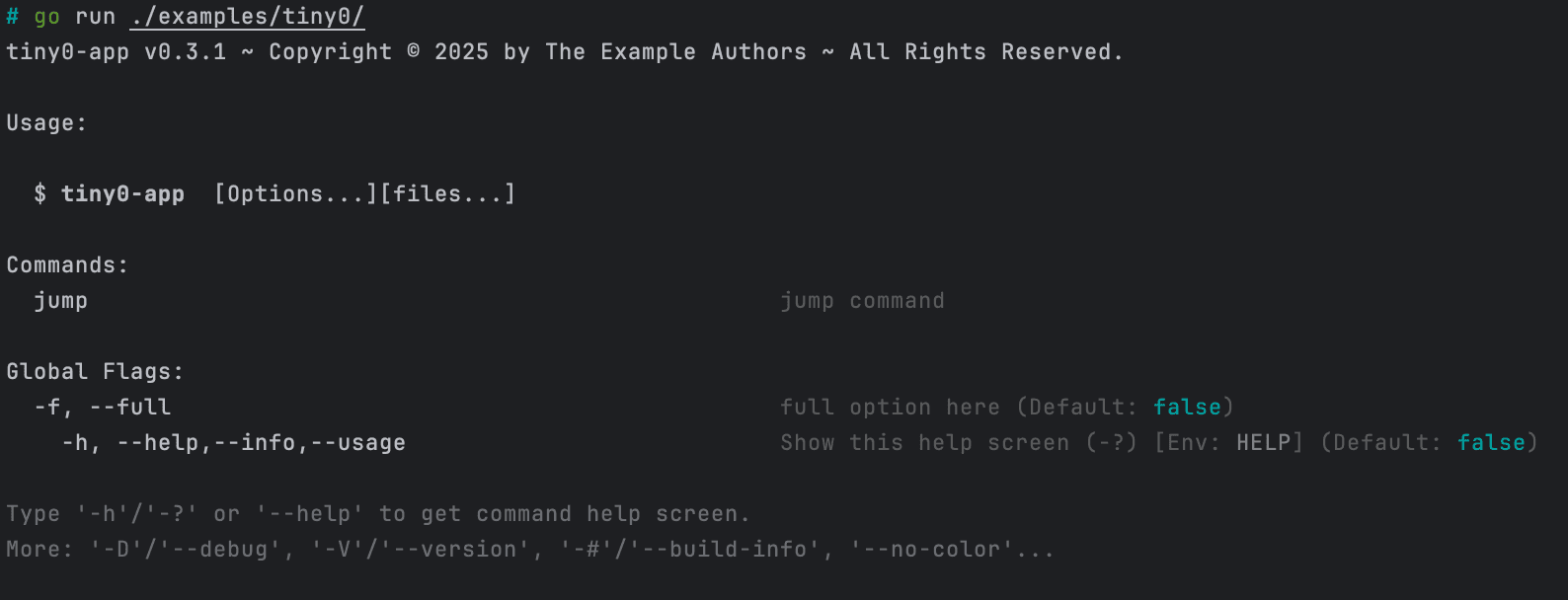
$ go run ./examples/tiny0/

...[help screen ignored here]

$ go run ./examples/tiny0/ jump
jump command: (0x1024be4c0,0x140000766c8)

$ go run ./examples/tiny0/ jump --full
jump command: (0x1024be4c0,0x140000766c8)
DumpThe help screen looks like,
额外的话题
在这个微型示例程序中,我们没有使用标准的 Store,因此 cmdr 自行创建了一个隐含的 DummyStore,它废弃一切进入的操作。
也因此 cmd.Store().MustBool("full") 无法取得 --full 的用户输入值。
为此这里使用了变通的办法:通过检测 full 的 *Flag 对象被终端用户触发的次数非零来确定它已经被输入了。
注意,如果用户在命令行输入了 --full -f,则触发次数将会是 2。
cmd.FlagBy("full") 可以按照选项参数的长标题来找到对应的 *Flag 对象。
类似地,cmd.SubCmdBy("xxx") 可以用来找到子命令。
这两者都是非递归的。
如果你想递归向下查找,cmd.(*cli.CmdS).FindSubCommandRecursive(ctx, longTitle, wide) 可以做到。这组函数有,
FindSubCommandFindSubCommandRecursiveFindFlagFindFlagRecursive
它们在 *cli.CmdS 上提供,但目前没有在 interface Cmd 上提供,所以可能你需要一个 Type Assertion 进行转换。
使用 Create()
Create() 和 blueprint example 给出了工程实践中的推荐风格,它们能够令大型命令体系结构更容易被管理。
参见:
blueprintin docs: examples/blueprint
使用结构和 Tag 快速建立命令层次
Create().BuildFrom(structValue, opts...) 能够通过给出的 struct-value 来构造子命令和 Flag。
这种方法能够快速搭建命令层次结构,参见:
Learn More
Github 上的 repos:
Learn more about `hedzr/store`
Learn more about `hedzr/evendeep`
Learn more about `hedzr/logg`
Learn more about `hedzr/is`
Design
cmdr.v2 依赖这些基础库:
除此之外,cmdr.v2 主要依赖于 Go 标准库或者 golang.org 的扩展库。
通常情况下 cmdr.v2 不依赖其他第三方库,但当你使用 hedzr/Store 和 hedzr/cmdr-loader 来加载外部配置文件时,则一些通用第三方库将会被加入到依赖表。典型的例子是 toml,yaml 等格式解析库。
cmdr.v2 尽可能是依赖关系简明化,以便能向你提供清晰的供应链清单。
所有的基于 cmdr.v2 的 app 都包含内建命令 sbom 来打印一个 YAML 格式的供应链数据集以供整合与审查。
Footnotes
Footnotes
What is Next?
How is this guide?
最后更新于