命令
What is Subcommand
示例程序
没有子命令的 CLI app - Covered on wget
像 wget 这样的古典 Unix app,并不提供子命令。它可能带有大量的标志,其中一些标志带有命令性质,会请求 app 使用不同的工作逻辑。
一个非完整的 wget 复刻品,在 cmdr 支持下可以这样编写:
package main

import (
	"context"
	"os"

	"github.com/hedzr/cmdr/v2"
	"github.com/hedzr/cmdr/v2/cli"
)

func main() {
	ctx := context.Background() // with cancel can be passed thru in your actions
	app := prepareApp()
	if err := app.Run(ctx); err != nil {
		println("Application Error:", err)
		os.Exit(app.SuggestRetCode())
	}
}

const (
	wgetVersion = "1.20"

	cStartup          = "10.Startup"
	cLogging          = "20.Logging and input file"
	cDownload         = "30.Download"
	cDirectories      = "40.Directories"
	cHTTPOptions      = "50.HTTP Options"
	cHTTPSOptions     = "51.HTTPS (SSL/TLS) options"
	cHstsOptions      = "52.HSTS options"
	cFtpOptions       = "53.FTP options"
	cFtpsOptions      = "54.FTPS options"
	cWarcOptions      = "55.WARC options"
	cRecusiveDownload = "60.Recursive download"
	cRecusiveAccept   = "61.Recursive accept/reject"
)

func prepareApp(opts ...cli.Opt) (app cli.App) {
	app = cmdr.New(opts...).
		Info("wget", wgetVersion).
		Author("The Example Authors").
		Header(`GNU Wget 1.20, a non-interactive network retriever.

Usage: wget [OPTION]... [URL]...

Mandatory arguments to long options are mandatory for short options too.`) // .Description(``).Header(``).Footer(``)

	app.With(func(app cli.App) {
		app.Flg("background", "b", "bg").Description(`go to background after startup`).Group(cStartup).Build()
		app.Flg("execute", "e").Description(`execute a '.wgetrc'-style command`).Group(cStartup).Default("").PlaceHolder("COMMAND").Build()

		app.Flg("output-file", "o").Description(`log messages to FILE`).Group(cLogging).PlaceHolder("FILE").Default("").Build()
		app.Flg("append-output", "a").Description(`append messages to FILE`).Group(cLogging).PlaceHolder("FILE").Default("").Build()
		app.Flg("no-verbose", "nv").Description(`turn off verboseness, without being quiet`).Group(cLogging).Default("").Build()
		app.Flg("report-speed", "").Description(`output bandwidth as TYPE.  TYPE can be bits`).Group(cLogging).Default("").PlaceHolder("TYPE").Build()
		app.Flg("input-file", "i").Description(`download URLs found in local or external FILE`).Group(cLogging).Default("").PlaceHolder("FILE").Build()
		app.Flg("force-html", "F").Description(`treat input file as HTML`).Group(cLogging).Build()
		app.Flg("base", "b").Description(`resolves HTML input-file links (-i -F)  relative to URL`).Default("").PlaceHolder("URL").Group(cLogging).Build()
		app.Flg("config").Description(`specify config file to use`).Group(cLogging).Default("").PlaceHolder("FILE").Build()
		app.Flg("no-config").Description(`do not read any config file`).Group(cLogging).Build()
		app.Flg("rejected-log").Description(`log reasons for URL rejection to FILE`).Group(cLogging).Default("").PlaceHolder("FILE").Build()

		app.Flg("retry-connrefused", "").Description(`retry even if connection is refused`).Group(cDownload).Build()
		app.Flg("retry-on-http-error").Description(`comma-separated list of HTTP errors to retry`).Group(cDownload).Default([]string{}).PlaceHolder("ERRORS").Build()
		app.Flg("output-document", "O").Description(`write documents to FILE`).Group(cDownload).Default("").PlaceHolder("FILE").Build()
		app.Flg("no-clobber", "nc").Description(`skip downloads that would download to existing files (overwriting them)`).Group(cDownload).Build()
		app.Flg("no-netrc").Description(`don't try to obtain credentials from .netrc`).Group(cDownload).Build()
		app.Flg("continue", "c").Description(`resume getting a partially-downloaded file`).Group(cDownload).Build()
	})

	app.OnAction(func(ctx context.Context, cmd cli.Cmd, args []string) (err error) {
		println(`wget ran.`)
		_, err = cmd.App().DoBuiltinAction(ctx, cli.ActionShowHelpScreen)
		return
	})

	// app.RootBuilder(func(parent cli.CommandBuilder) {
	// 	// parent.Cmd(...)...
	// 	parent.OnAction(...)
	// })
	return
}注意对于仅有根命令的 app,直接在 app 对象上应用 OnAction 来指定命令响应回调函数。
如果你已经喜欢上了 CommandBuilder/FlagBuilder 方式来构造命令和标志,在 app 对象上还有一个 RootBuilder 可以为你开启相应的回调代码块:
	app.RootBuilder(func(parent cli.CommandBuilder) {
		// parent.Cmd(...)...
		parent.OnAction(...)
})这和 app.Cmd("subcmd").With(func(b cli.CommandBuilder){ ... }) 相似,只不过 parent 代表的是 app.RootCommand(),而 b 代表的是新建的子命令 subcmd。
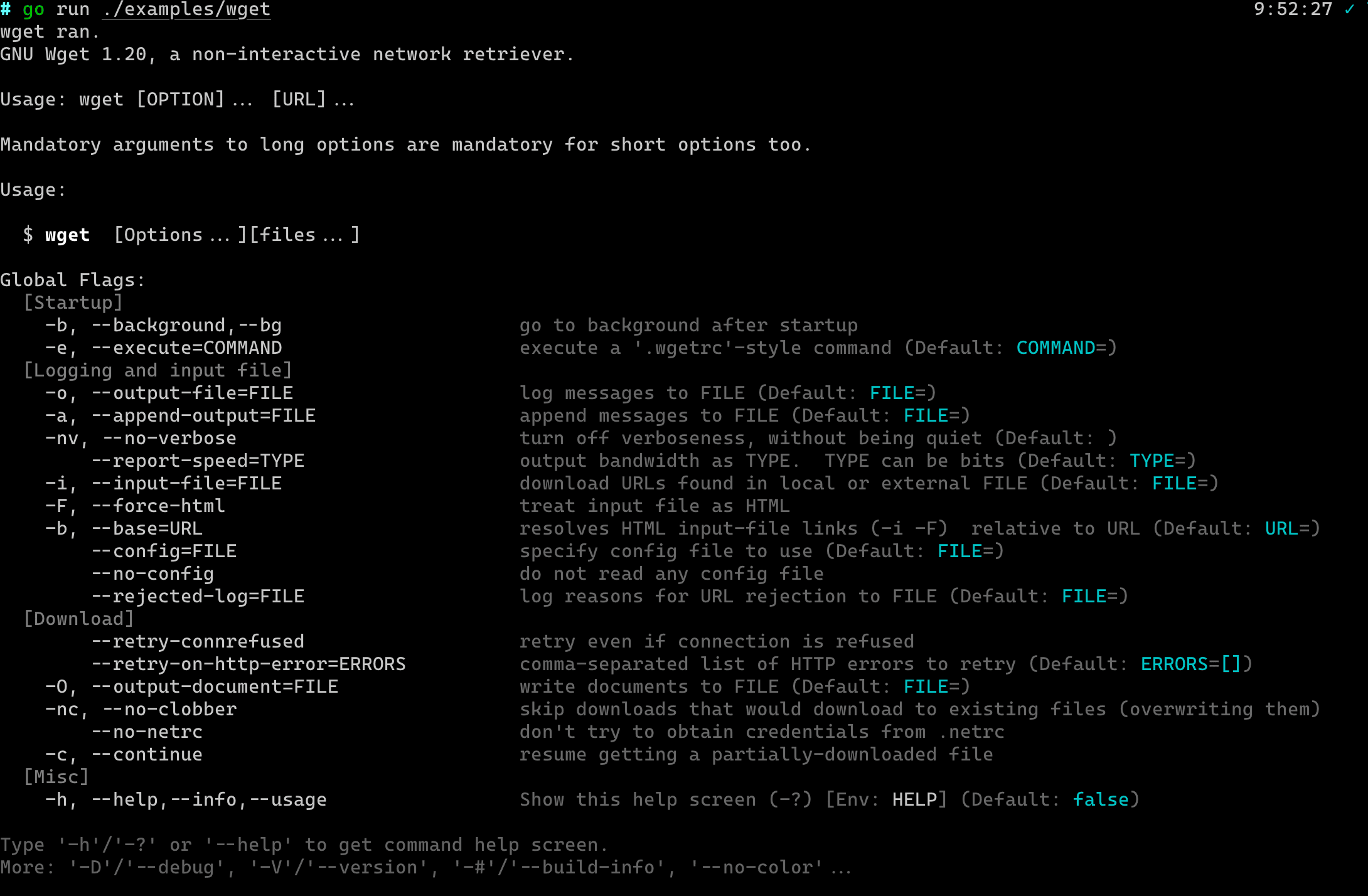
运行时的帮助屏效果为:
带有多级子命令
有颜色的描述文字
在 Description 字段被显示之前,它会首先被 is/term/color 中的颜色预处理器格式化。
所以它实际上是带有颜色属性的。
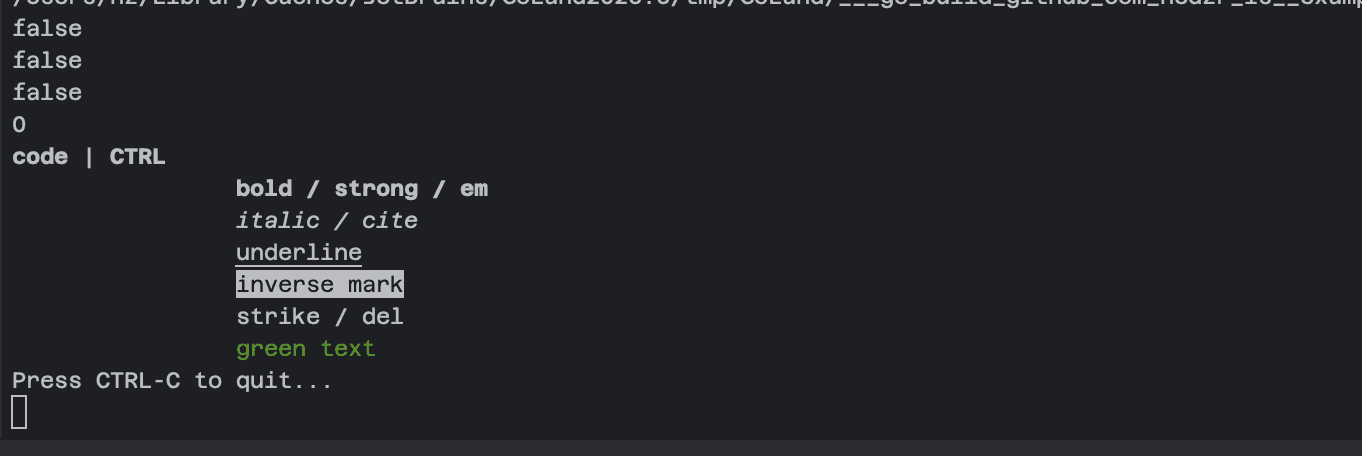
这些格式化的特性包含一个微型 HTML Tag 解析器。这就是说,下面的代码能够正确工作:
    // or:
    //    is.Color().GetColorTranslator().Translate("<b>bold</b>")
    fmt.Printf("%v", color.GetCPT().Translate(`
        <code>code</code> | <kbd>CTRL</kbd>
        <b>bold / strong / em</b>
        <i>italic / cite</i>
        <u>underline</u>
        <mark>inverse mark</mark>
        <del>strike / del </del>
        <font color="green">green text</font>
`, color.FgDefault))相应的输出在一个支持颜色的终端仿真器上大致是这样的效果:
详情可以参考 hedzr/is 的相关介绍。
除了 Description 字段之外,Header, Footer, 以及 Examples 等等字段也包含颜色预格式化能力。
展开环境变量
在 Description (常规的单行描述,以及长格式的多行描述),Examples 等字段显示之前,其中的环境变量将被自动展开。
这包含两个层次:
$AppName格式 将被os.ExpandEnv()进行处理并展开。{ {.AppNmae}}格式将被一个text.Template引擎进行展开。
第一个格式所能展开的环境变量,取决于你的 Shell 环境。除此之外,cmdr 在运行时刻也附加额外的环境变量,基本上这包括了:
  CMDR_VERSION = v2.1.16
  STORE_VERSION = v1.3.15
  APP = blueprint
  APPNAME = blueprint
  APP_NAME = blueprint
  APP_VER = v2.1.16
  APP_VERSION = v2.1.16
  EXE = /var/folders/zv/5r7hq8bs6qs3cx2z743t_3_h0000gn/T/go-build4111051262/b001/exe/blueprint
  EXE_DIR = /var/folders/zv/5r7hq8bs6qs3cx2z743t_3_h0000gn/T/go-build4111051262/b001/exe
  CONFIG_DIR = /Users/hz/.config/blueprint
  CACHE_DIR = /Users/hz/.cache/blueprint
  COMMON_SHARE_DIR = /usr/local/share/blueprint
  LOCAL_SHARE_DIR = /Users/hz/.local/share/blueprint
  DATA_DIR = /Users/hz/.local/share/blueprint
TEMP_DIR = /var/folders/zv/5r7hq8bs6qs3cx2z743t_3_h0000gn/T/blueprint可用的环境变量列表可以通过执行命令 app ~~debug ~~env 来显示。
第二个格式所能展开的变量,包含在如下的结构定义中:
struct {
  AppName     string
  AppVersion  string
  DadCommands string // for curr-cmd is `jump to`: "jump"
  Commands    string // for curr-cmd is `jump to`: "jump to"
  *parseCtx
}如需进一步信息,请查阅相应的源代码:func (s *parseCtx) Translate(pattern string) (result string)。
额外的话题
额外的话题
Howto run a subcmd directly from root
Command
Command: Invokes
Command: Preset Args
Command: Redirect To
Command: Dynamic Cmd
Command: Dynamic Cmd From Config
Command: Event Handlers
What is Next?
How is this guide?
最后更新于