Creating Lots of Flags
Flags, Lots of Flags
Creating Flag and Accessing it
Just like mentioned in last section, you may create lots of flags in a .With(cb) callback code block, which of them will belong to its parent command.
A sample app works like this,
package main

import (
	"context"
	"fmt"
	"os"

	"github.com/hedzr/cmdr-loaders/local"
	"github.com/hedzr/cmdr-tests/examples/common"
	"github.com/hedzr/cmdr-tests/examples/common/cmd"
	"github.com/hedzr/cmdr/v2"
	"github.com/hedzr/cmdr/v2/cli"
	logz "github.com/hedzr/logg/slog"
	"github.com/hedzr/store"
)

const (
	appName = "lots-flags"
)

func main() {
	app := chain(common.PrepareApp(
		appName,

		// use an option store explicitly, or a dummy store by default
		cmdr.WithStore(store.New()),

		// import "github.com/hedzr/cmdr-loaders/local" to get in advanced external loading features
		cmdr.WithExternalLoaders(
			local.NewConfigFileLoader(
				local.WithAlternateWriteBack(false), // disable write-back the modified state into alternative config file
				local.WithAlternateDotPrefix(false), // use '<app-name>.toml' instead of '.<app-name>.toml'
			),
			local.NewEnvVarLoader(),
		),
	)(cmd.Commands...))

	ctx := context.Background() // with cancel can be passed thru in your actions
	if err := app.Run(ctx); err != nil {
		logz.ErrorContext(ctx, "Application Error:", "err", err) // stacktrace if in debug mode/build
		os.Exit(app.SuggestRetCode())
	} else if rc := app.SuggestRetCode(); rc != 0 {
		os.Exit(rc)
	}
}

func chain(app cli.App) cli.App {
	app.Cmd("cmd").
		Description("subcommands with lots of flags here").
		With(func(b cli.CommandBuilder) {
			for i := 0; i < 15; i++ {
				b.Flg(fmt.Sprintf("option-%d", i), fmt.Sprintf("o%d", i)).
					Description(fmt.Sprintf("flag(option)-%d here", i)).
					Build()
			}
		})
	return app
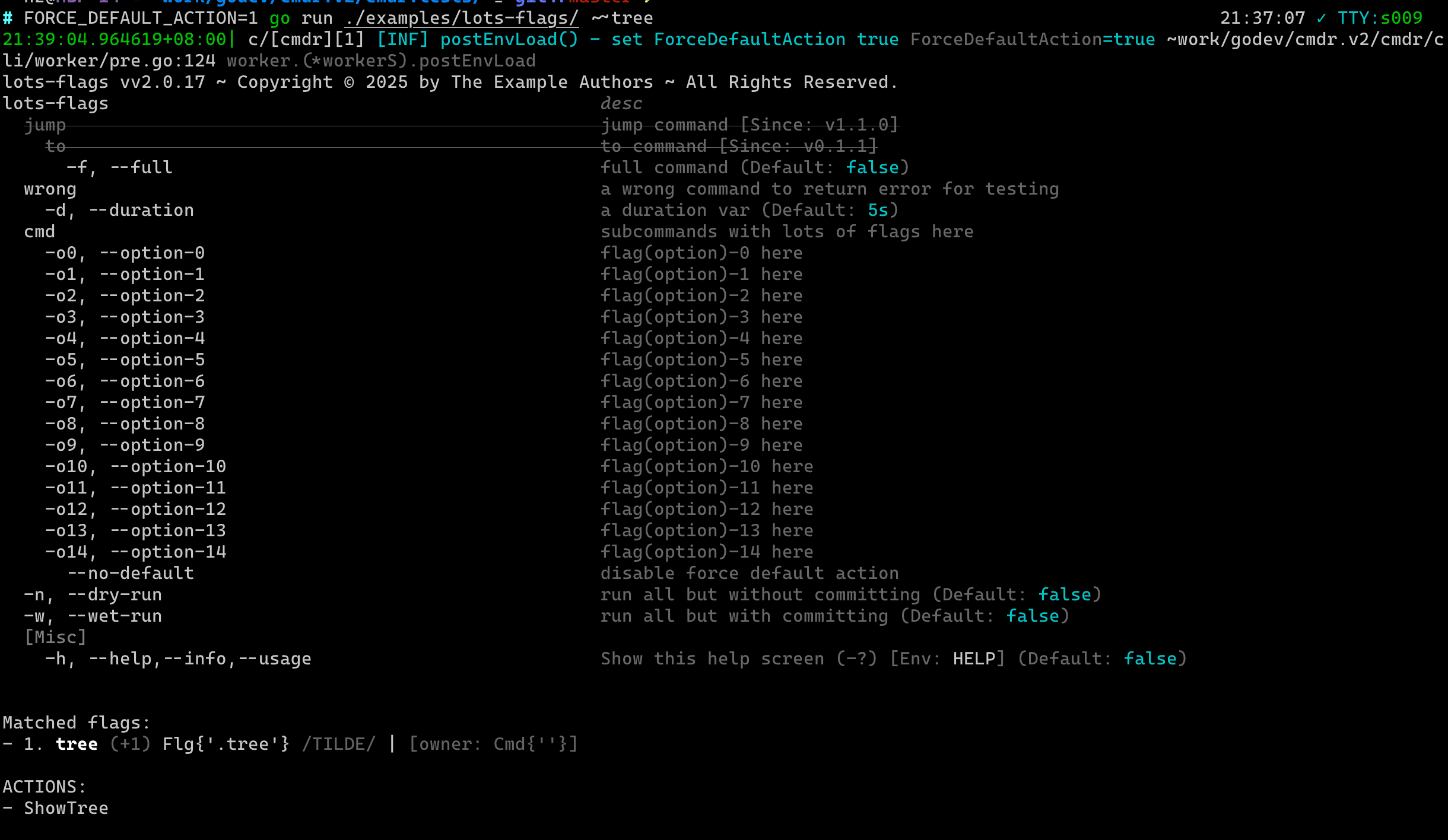
}Now run it with command line option ~~tree, which is a builtin option with cmdr.v2, to dump all commands hierarchy as following:
$ FORCE_DEFAULT_ACTION=1 go run ./examples/lots-flags/ ~~tree
...So the result would be like,
Remarks
We said, the environment variable with value FORCE_DEFAULT_ACTION=1 makes cmdr.v2 ignore your custom OnAction to invoke a builtin responsed callback function, which will display a debug list for the hit command and the hit flags of its.
This would be useful for debugging.
Extra Topics
What is Next?
How is this guide?
Last updated on