Command
What is Subcommand
Sample app
Without subcmd - Covered on wget
Just like grep, awk or more classical Unix apps, they are not using subcommand to keep simple and small.
But things goes complicated over time, this is a certainly truth.
So you will see lots of flags in wget app. Some of these flags has command's behavior in fact.
Anyway, here is a non-completely covered app for wget, written with cmdr way:
package main

import (
	"context"
	"os"

	"github.com/hedzr/cmdr/v2"
	"github.com/hedzr/cmdr/v2/cli"
)

func main() {
	ctx := context.Background() // with cancel can be passed thru in your actions
	app := prepareApp()
	if err := app.Run(ctx); err != nil {
		println("Application Error:", err)
		os.Exit(app.SuggestRetCode())
	}
}

const (
	wgetVersion = "1.20"

	cStartup          = "10.Startup"
	cLogging          = "20.Logging and input file"
	cDownload         = "30.Download"
	cDirectories      = "40.Directories"
	cHTTPOptions      = "50.HTTP Options"
	cHTTPSOptions     = "51.HTTPS (SSL/TLS) options"
	cHstsOptions      = "52.HSTS options"
	cFtpOptions       = "53.FTP options"
	cFtpsOptions      = "54.FTPS options"
	cWarcOptions      = "55.WARC options"
	cRecusiveDownload = "60.Recursive download"
	cRecusiveAccept   = "61.Recursive accept/reject"
)

func prepareApp(opts ...cli.Opt) (app cli.App) {
	app = cmdr.New(opts...).
		Info("wget", wgetVersion).
		Author("The Example Authors").
		Header(`GNU Wget 1.20, a non-interactive network retriever.

Usage: wget [OPTION]... [URL]...

Mandatory arguments to long options are mandatory for short options too.`) // .Description(``).Header(``).Footer(``)

	app.With(func(app cli.App) {
		app.Flg("background", "b", "bg").Description(`go to background after startup`).Group(cStartup).Build()
		app.Flg("execute", "e").Description(`execute a '.wgetrc'-style command`).Group(cStartup).Default("").PlaceHolder("COMMAND").Build()

		app.Flg("output-file", "o").Description(`log messages to FILE`).Group(cLogging).PlaceHolder("FILE").Default("").Build()
		app.Flg("append-output", "a").Description(`append messages to FILE`).Group(cLogging).PlaceHolder("FILE").Default("").Build()
		app.Flg("no-verbose", "nv").Description(`turn off verboseness, without being quiet`).Group(cLogging).Default("").Build()
		app.Flg("report-speed", "").Description(`output bandwidth as TYPE.  TYPE can be bits`).Group(cLogging).Default("").PlaceHolder("TYPE").Build()
		app.Flg("input-file", "i").Description(`download URLs found in local or external FILE`).Group(cLogging).Default("").PlaceHolder("FILE").Build()
		app.Flg("force-html", "F").Description(`treat input file as HTML`).Group(cLogging).Build()
		app.Flg("base", "b").Description(`resolves HTML input-file links (-i -F)  relative to URL`).Default("").PlaceHolder("URL").Group(cLogging).Build()
		app.Flg("config").Description(`specify config file to use`).Group(cLogging).Default("").PlaceHolder("FILE").Build()
		app.Flg("no-config").Description(`do not read any config file`).Group(cLogging).Build()
		app.Flg("rejected-log").Description(`log reasons for URL rejection to FILE`).Group(cLogging).Default("").PlaceHolder("FILE").Build()

		app.Flg("retry-connrefused", "").Description(`retry even if connection is refused`).Group(cDownload).Build()
		app.Flg("retry-on-http-error").Description(`comma-separated list of HTTP errors to retry`).Group(cDownload).Default([]string{}).PlaceHolder("ERRORS").Build()
		app.Flg("output-document", "O").Description(`write documents to FILE`).Group(cDownload).Default("").PlaceHolder("FILE").Build()
		app.Flg("no-clobber", "nc").Description(`skip downloads that would download to existing files (overwriting them)`).Group(cDownload).Build()
		app.Flg("no-netrc").Description(`don't try to obtain credentials from .netrc`).Group(cDownload).Build()
		app.Flg("continue", "c").Description(`resume getting a partially-downloaded file`).Group(cDownload).Build()
	})

	app.OnAction(func(ctx context.Context, cmd cli.Cmd, args []string) (err error) {
		println(`wget ran.`)
		_, err = cmd.App().DoBuiltinAction(ctx, cli.ActionShowHelpScreen)
		return
	})

	// app.RootBuilder(func(parent cli.CommandBuilder) {
	// 	// parent.Cmd(...)...
	// 	parent.OnAction(...)
	// })
	return
}There is an OnAction handler attached to app object, which will handle the app call from command-line without subcmds (but flags).
With CommandBuilder/FlagBuilder way, you can setup it by RootBuilder:
	app.RootBuilder(func(parent cli.CommandBuilder) {
		// parent.Cmd(...)...
		parent.OnAction(...)
})It's similar with app.Cmd("subcmd").With(func(b cli.CommandBuilder){ ... }). Here parent means app.RootCommand() object, and b is for the new creating subcmd.
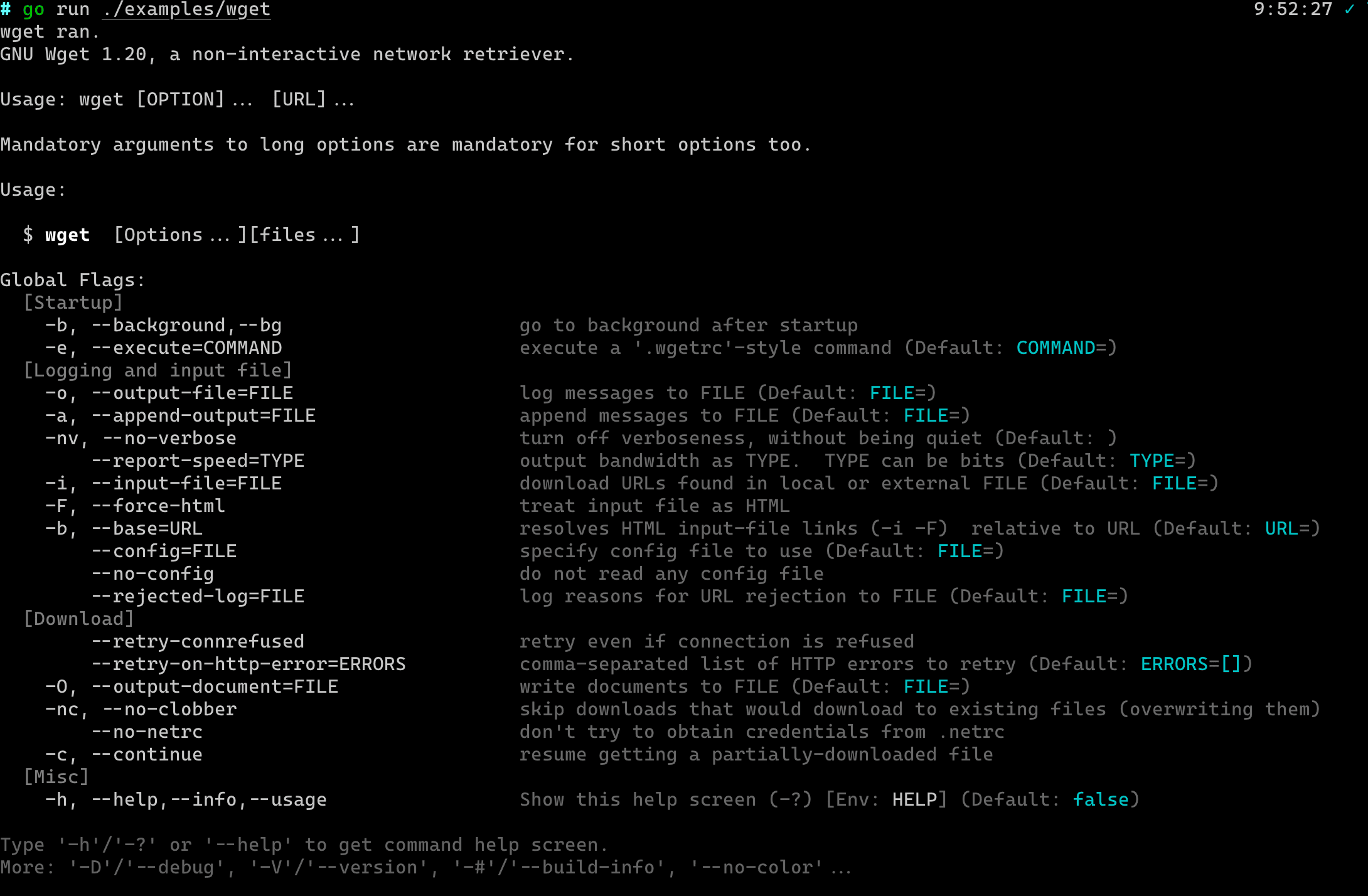
The app runs as:
With subcmd
See it at lots-of-subcommands.
Colorful fields
Before Description was been displaying, it will be formatted by color Translator in is/term/color.
So it's colorful.
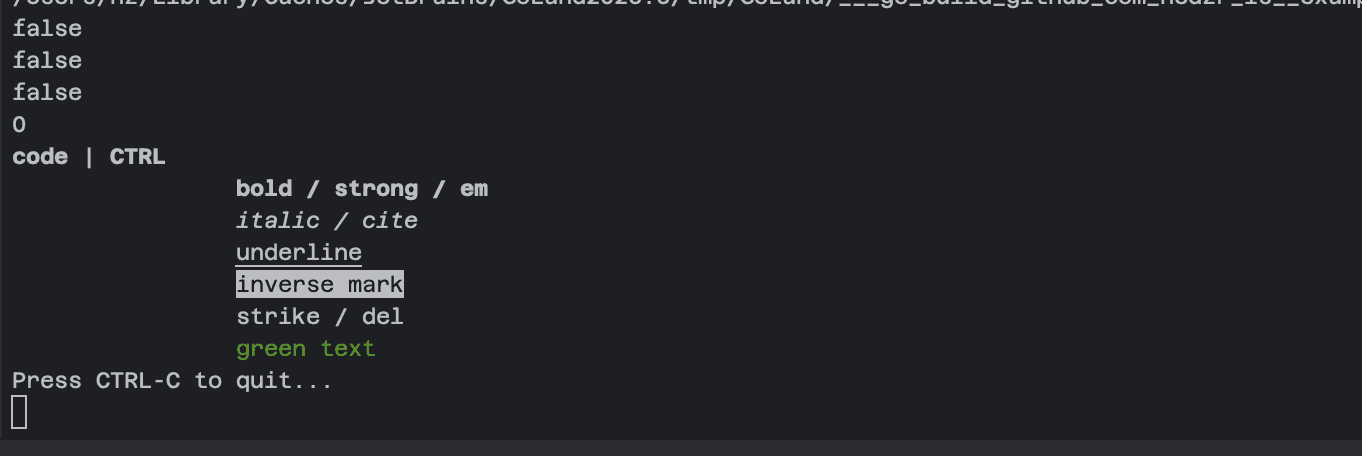
The translating microcodes includes a tiny html tag expander. That is saying, these following codes works well:
    // or:
    //    is.Color().GetColorTranslator().Translate("<b>bold</b>")
    fmt.Printf("%v", color.GetCPT().Translate(`
        <code>code</code> | <kbd>CTRL</kbd>
        <b>bold / strong / em</b>
        <i>italic / cite</i>
        <u>underline</u>
        <mark>inverse mark</mark>
        <del>strike / del </del>
        <font color="green">green text</font>
`, color.FgDefault))The corresponding output on a colorful terminal simulator would be:
For more details please see readme of hedzr/is.
Except for Description field, This features also works for these fields: Header, Footer and Examples, and so on.
Expanding envvar at displaying
At displaying time, for instace help screen printing, the environment variables will be expanded for those large text fields:
Description (single line or multiple lines), Examples, Note, and so on.
The behavior includes two actions:
- The
$AppNametext will be expanded byos.ExpandEnv(), - The
{ {.AppNmae}}text will be expanded by atext.Templateengine.
In the first form, which variables could be expanded, were decided by your shell. Besides these, cmdr also injects some extra variables into the running env. It includes,
  CMDR_VERSION = v2.1.16
  STORE_VERSION = v1.3.15
  APP = blueprint
  APPNAME = blueprint
  APP_NAME = blueprint
  APP_VER = v2.1.16
  APP_VERSION = v2.1.16
  EXE = /var/folders/zv/5r7hq8bs6qs3cx2z743t_3_h0000gn/T/go-build4111051262/b001/exe/blueprint
  EXE_DIR = /var/folders/zv/5r7hq8bs6qs3cx2z743t_3_h0000gn/T/go-build4111051262/b001/exe
  CONFIG_DIR = /Users/hz/.config/blueprint
  CACHE_DIR = /Users/hz/.cache/blueprint
  COMMON_SHARE_DIR = /usr/local/share/blueprint
  LOCAL_SHARE_DIR = /Users/hz/.local/share/blueprint
  DATA_DIR = /Users/hz/.local/share/blueprint
TEMP_DIR = /var/folders/zv/5r7hq8bs6qs3cx2z743t_3_h0000gn/T/blueprintYou could get an exact list of them by running app ~~debug ~~env.
In the second form, the variables are specified by a struct definition:
struct {
  AppName     string
  AppVersion  string
  DadCommands string // for curr-cmd is `jump to`: "jump"
  Commands    string // for curr-cmd is `jump to`: "jump to"
  *parseCtx
}To see its source code, go and surf func (s *parseCtx) Translate(pattern string) (result string).
额外的话题
Howto run a subcmd directly from root
Command
Command: Invokes
Command: Preset Args
Command: Redirect To
Command: Dynamic Cmd
Command: Dynamic Cmd From Config
Command: Event Handlers
What is Next?
How is this guide?
Last updated on