Builtin Commands & Flags
provided by cmdr
The builtin commands and flags
Up to cmdr v2.1.x, we provides these following builtin commands and flags.
Some of them are not planned to be implemented right away.
Our misson is staying to freeze the core APIs currently. This work has almost been done in v2.1.
Commands
generatemanualdoc(NOT-YET)shell
sbomversionhelp
help Command
help Command is very like --help flag, but it worked under a prompt mode, so you can query any commands with their help screen again and again, and launch one of them.
We planned to make a Q&A subsystem here, and it's partial done now.
version Command
version Command lists the version number and built information mainly.
In your build script, following Production is appreciated. It will include: write the building metadata into the target executable file, and other relevant data. Then the version command's output will be meaningful.
See also --version.
$ ./bin/blueprint --version
v2.1.1
blueprint
2025-03-18T11:17:45Z
e936495
go version go1.23.7 darwin/arm64
v1.3.0-dirty


$ ./bin/blueprint -V
v2.1.1
$The verbose level is varies in the two forms above.
NOTE that app version or app versions command is equivalent to app --version.
sbom Command
This command will print Golang SBOM information with YAML format.
$ ./bin/blueprint sbom
SBOM:
  executable: "~work/godev/cmdr.v2/cmdr.tests/bin/blueprint"
  go-version: go1.23.7
  path: github.com/hedzr/cmdr-tests/examples/blueprint
  module-path: github.com/hedzr/cmdr-tests
  module-version: (devel)
  module-sum:
  module-replace: <ignored>
  settings:
    - "-buildmode": exe
    - "-compiler": gc
    - "-ldflags": -s -w     -X 'github.com/hedzr/cmdr/v2/conf.Githash=e936495'     -X 'github.com/hedzr/cmdr/v2/conf.GitSummary=v1.3.0-dirty'     -X 'github.com/hedzr/cmdr/v2/conf.GitDesc=e936495 bump to v1.3.0'     -X 'github.com/hedzr/cmdr/v2/conf.BuilderComments='     -X 'github.com/hedzr/cmdr/v2/conf.GoVersion=go version go1.23.7 darwin/arm64'     -X 'github.com/hedzr/cmdr/v2/conf.Version='     -X 'github.com/hedzr/cmdr/v2/conf.AppName='     -X 'github.com/hedzr/cmdr/v2/conf.Buildstamp=2025-03-18T11:40:29Z'
    - "CGO_ENABLED": 1
    - "CGO_CFLAGS":
    - "CGO_CPPFLAGS":
    - "CGO_CXXFLAGS":
    - "CGO_LDFLAGS":
    - "GOARCH": arm64
    - "GOOS": darwin
    - "GOARM64": v8.0
    - "vcs": git
    - "vcs.revision": e936495ce05ed3d1a4473ca2dc93c6184abb4fe1
    - "vcs.time": 2025-03-13T03:26:11Z
    - "vcs.modified": true
  depends:
    - debug-module: { path: "github.com/fsnotify/fsnotify", version: "v1.8.0", sum: "h1:dAwr6QBTBZIkG8roQaJjGof0pp0EeF+tNV7YBP3F/8M=", replace: (*debug.Module)(nil) }
    - debug-module: { path: "github.com/hashicorp/hcl", version: "v1.0.0", sum: "h1:0Anlzjpi4vEasTeNFn2mLJgTSwt0+6sfsiTG8qcWGx4=", replace: (*debug.Module)(nil) }
    - debug-module: { path: "github.com/hedzr/cmdr-loaders", version: "(devel)", sum: "", replace: (*debug.Module)(nil) }
    - debug-module: { path: "github.com/hedzr/cmdr/v2", version: "(devel)", sum: "", replace: (*debug.Module)(nil) }
    - debug-module: { path: "github.com/hedzr/evendeep", version: "(devel)", sum: "", replace: (*debug.Module)(nil) }
    - debug-module: { path: "github.com/hedzr/is", version: "(devel)", sum: "", replace: (*debug.Module)(nil) }
    - debug-module: { path: "github.com/hedzr/logg", version: "(devel)", sum: "", replace: (*debug.Module)(nil) }
    - debug-module: { path: "github.com/hedzr/store", version: "(devel)", sum: "", replace: (*debug.Module)(nil) }
    - debug-module: { path: "github.com/hedzr/store/codecs/hcl", version: "v1.3.2", sum: "h1:OWfhelBbDANxGqBV6wH4c6tIJ37VgN2hewqhaAnh+iU=", replace: (*debug.Module)(nil) }
    - debug-module: { path: "github.com/hedzr/store/codecs/hjson", version: "v1.3.2", sum: "h1:rCHg5rVsI7LF9h4H9q6VPQnt5mu2+g6TvbCTtpUMBdY=", replace: (*debug.Module)(nil) }
    - debug-module: { path: "github.com/hedzr/store/codecs/json", version: "v1.3.2", sum: "h1:jIN4mICShavdyyyPuqtw+491VDJWseUkwr0MdHqfJxU=", replace: (*debug.Module)(nil) }
    - debug-module: { path: "github.com/hedzr/store/codecs/nestext", version: "v1.3.2", sum: "h1:DFV96BIWiy7wBbWzer4aPG7xWd/JcPzRKe27yjWbWH8=", replace: (*debug.Module)(nil) }
    - debug-module: { path: "github.com/hedzr/store/codecs/toml", version: "v1.3.2", sum: "h1:mC9FOXUlLK2xThbS7rkX7rFW61Q0U1VHLPRWUTD2XlM=", replace: (*debug.Module)(nil) }
    - debug-module: { path: "github.com/hedzr/store/codecs/yaml", version: "v1.3.2", sum: "h1:v6AFIB8VjzGunXW3FPBkCVT5KIPhC6svU/kV5GdzbEQ=", replace: (*debug.Module)(nil) }
    - debug-module: { path: "github.com/hedzr/store/providers/env", version: "v1.3.2", sum: "h1:UfUj22yFEAO245yCNIDdTUxvVR9NIavjjHf5xsXZAKU=", replace: (*debug.Module)(nil) }
    - debug-module: { path: "github.com/hedzr/store/providers/file", version: "v1.3.2", sum: "h1:j2ls+yN5ccGpOfKVEfT6HZZN4gQ3cbJe/vXla5ZaWXc=", replace: (*debug.Module)(nil) }
    - debug-module: { path: "github.com/hjson/hjson-go/v4", version: "v4.4.0", sum: "h1:D/NPvqOCH6/eisTb5/ztuIS8GUvmpHaLOcNk1Bjr298=", replace: (*debug.Module)(nil) }
    - debug-module: { path: "github.com/npillmayer/nestext", version: "v0.1.3", sum: "h1:2dkbzJ5xMcyJW5b8wwrX+nnRNvf/Nn1KwGhIauGyE2E=", replace: (*debug.Module)(nil) }
    - debug-module: { path: "github.com/pelletier/go-toml/v2", version: "v2.2.3", sum: "h1:YmeHyLY8mFWbdkNWwpr+qIL2bEqT0o95WSdkNHvL12M=", replace: (*debug.Module)(nil) }
    - debug-module: { path: "golang.org/x/crypto", version: "v0.36.0", sum: "h1:AnAEvhDddvBdpY+uR+MyHmuZzzNqXSe/GvuDeob5L34=", replace: (*debug.Module)(nil) }
    - debug-module: { path: "golang.org/x/exp", version: "v0.0.0-20250305212735-054e65f0b394", sum: "h1:nDVHiLt8aIbd/VzvPWN6kSOPE7+F/fNFDSXLVYkE/Iw=", replace: (*debug.Module)(nil) }
    - debug-module: { path: "golang.org/x/net", version: "v0.37.0", sum: "h1:1zLorHbz+LYj7MQlSf1+2tPIIgibq2eL5xkrGk6f+2c=", replace: (*debug.Module)(nil) }
    - debug-module: { path: "golang.org/x/sys", version: "v0.31.0", sum: "h1:ioabZlmFYtWhL+TRYpcnNlLwhyxaM9kWTDEmfnprqik=", replace: (*debug.Module)(nil) }
    - debug-module: { path: "golang.org/x/term", version: "v0.30.0", sum: "h1:PQ39fJZ+mfadBm0y5WlL4vlM7Sx1Hgf13sMIY2+QS9Y=", replace: (*debug.Module)(nil) }
    - debug-module: { path: "gopkg.in/hedzr/errors.v3", version: "v3.3.5", sum: "h1:bF4ijq4PAjwjCB8s7nWf2cjqo/yp6afNuQMC2SnX7t8=", replace: (*debug.Module)(nil) }
- debug-module: { path: "gopkg.in/yaml.v3", version: "v3.0.1", sum: "h1:fxVm/GzAzEWqLHuvctI91KS9hhNmmWOoWu0XTYJS7CA=", replace: (*debug.Module)(nil) }So user can integrated it into their ERM or Supplier Chain Management system.
generate Command
The gen command is used for generating Linux manual and shell autocompletion script mainly.
generate doc (NOT-YET)
For cmdr.v1, this command can be used to generate markdown pages.
But in cmdr v2, it's not implemented yet. No further plan.
generate man
This command can walk the command tree and build the corresponding manpages.
For example, it generates ./man1/app-jump-to.man for the command jump to. For the app's root command, it generates ./man1/app.man for you.
All of the manpages should be deployed to the man/man1/app/ on your target OS. For those GNU-like, Linux-like, or Unix-like systems, this means a directory specified by MANPAGE environment variable. To ensure whatever folder should be exact target directory, you could run manpath shell command to get the information:
$ manpath
/usr/local/man:/usr/local/share/man:/usr/share/manOr, another way is,
$ whereis man
man: /usr/bin/man /usr/local/man /usr/share/man /usr/share/man/man1/man.1.gz /usr/share/man/man7/man.7.gzBy default, app generate man will make a new directory ./man1 and write all manpages in it. A sample result looks like:
$ go build -o ./bin/ ./examples/blueprint/
$ ./bin/blueprint g m -a
# generating manpages (output-dir: ./man1, all: true) ...
#    writing to man1/blueprint.man...
#    writing to man1/blueprint-soundex.man...
#    writing to man1/blueprint-jump.man...
#    writing to man1/blueprint-jump-to.man...
#    writing to man1/blueprint-wrong.man...
#    writing to man1/blueprint-invoke.man...
#    writing to man1/blueprint-invoke-shell.man...
#    writing to man1/blueprint-invoke-proc.man...
#    writing to man1/blueprint-preset.man...
#    writing to man1/blueprint-preset-cmd.man...
#    writing to man1/blueprint-sbom.man...
#    writing to man1/blueprint-generate.man...
#    writing to man1/blueprint-generate-manual.man...
#    writing to man1/blueprint-generate-doc.man...
#    writing to man1/blueprint-generate-shell.man...
#    writing to man1/blueprint-version.man...
#    writing to man1/blueprint-help.man...
#    DONE.
$
Tip
For the end-user, they can read help screen in manpage mode inplace:
app cmd --help --man--man tells cmdr transfer the help screen with manpage format and pipe it into man command.
See also:
- Linux 命令 man 全知全会 (in Chinese Only)
generate shell
cmdr.v2 and v1 ships the generators of shell autocompletion scripts now (since v2.1.11).
Generally you can always deploy the autocompletion script file automatically, especially for zsh environment:
$ ./bin/blueprint gen sh
...
# "/Users/hz/.oh-my-zsh/cache/completions/_blueprint" generated.
# Re-login to enable the new zsh completion script.But in another shells, it's necessary to move the generated autocompletion script file to the proper location manually.
app generate shell will try detecting these shells, and complete the most of tasks for you:
- zsh
- bash
- fish
- elvish (NOT YET)
- fig-shell (NOT YET)
- powershell
In theory, the autocompletion feature for your app will be enabled as well. But the well-tests are still needed for those shells such as fish-shell, powershell and so on.
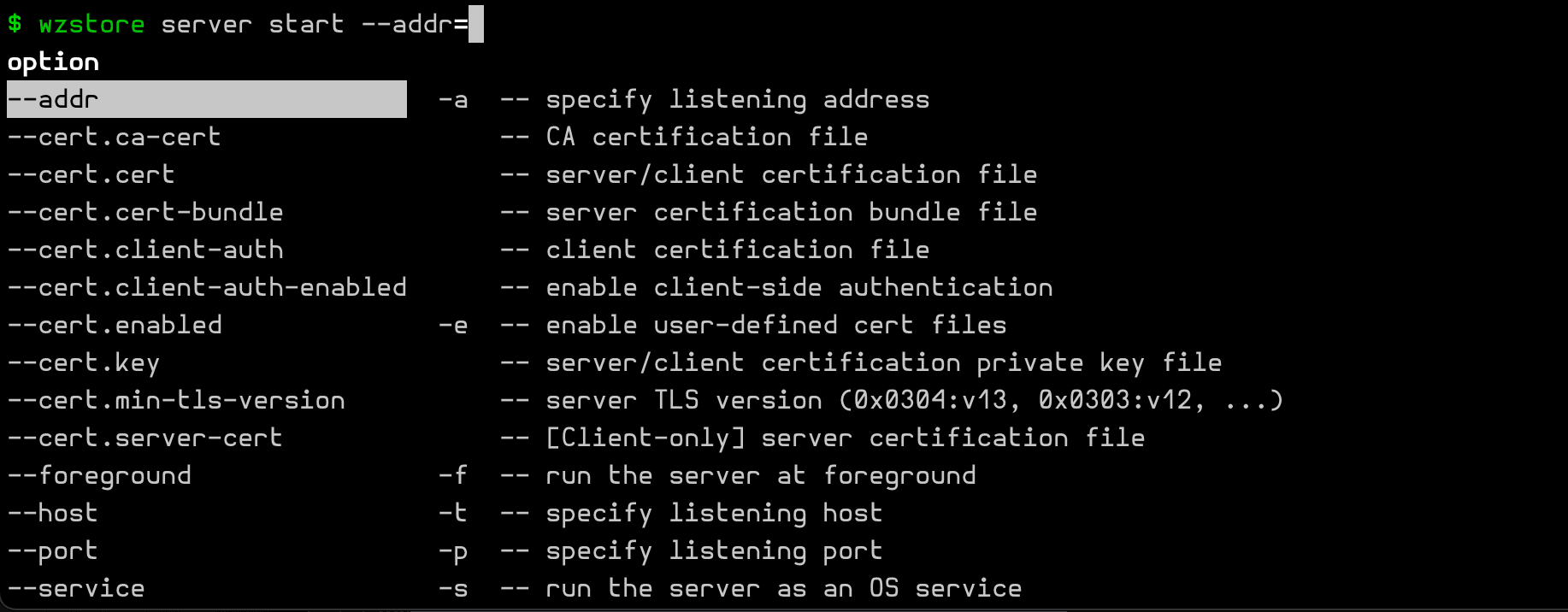
A sample of auto-completing flag of a subcommand was drawn in the following screenshot:
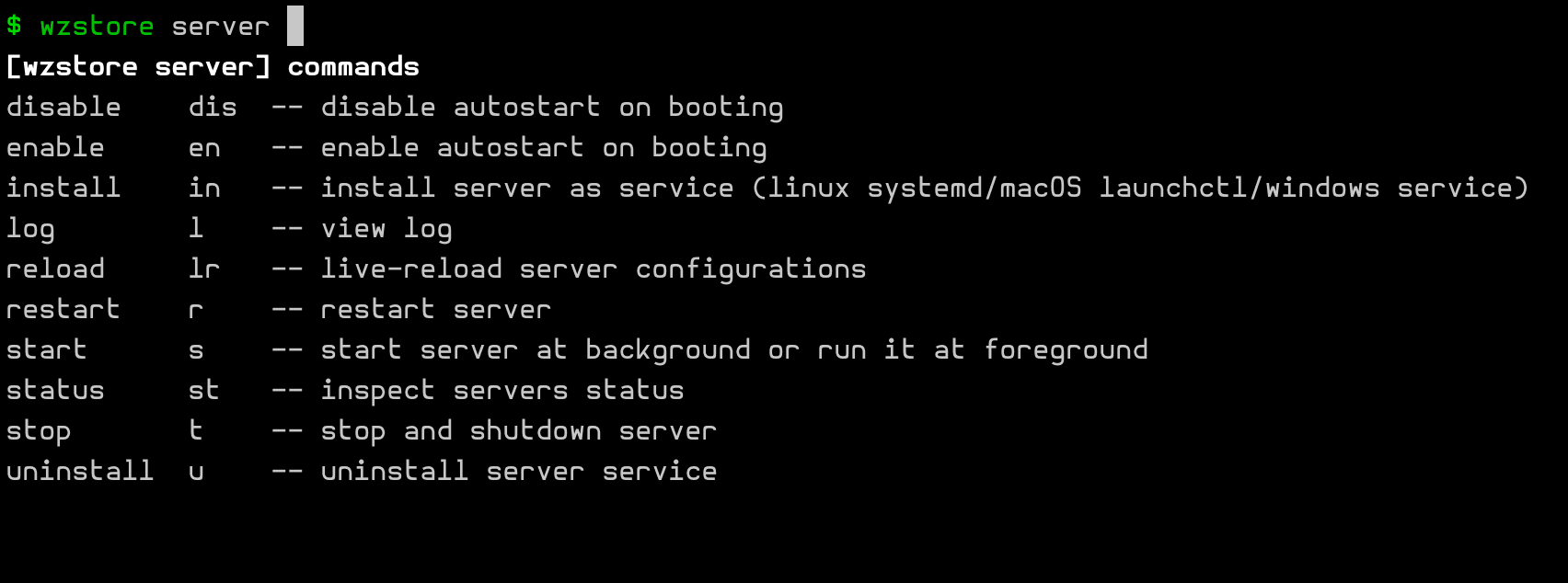
Another sample is for auto-completing a subcommand:
Flags
--help: print help screen--man: print help screen with manpage style--version: print versions information--build-info: print built information--version-sim: set a temporary version to expose to container system (such as k8s)--strict-mode: STRICT Mode & level--no-color: No Color Mode & Level--quiet: Quiet Mode & Level--verbose: Verbose Mode & Level--debug: Debug Mode & Level--config=FILEspecify a main config file for loading, overpassing the internal searching logics~~tree: print all commands (and flags) in tree mode~~debug: print internal debugging information
A notable thing is, --man will write a man.1 file for the current command, and launch the man.1 into man system.
Details
--version-sim
--version-sim can be used to simulate a temporary version different with the solidified one at building, which will be reported to the container mananger such as k8s.
Sometimes the feature might be useful for the gray scale test, A/B test and so on.
Modes and Levels
There are four modes for running an app: STRICT, NO-COLOR, QUIET and VERBOSE.
Refer these topics for the details:
is.QuietModeEnabled(),is.GetQuietLevel()is.NoColorModeEnabled(),is.GetNoColorLevel()is.DebugMode(),is.GetDebugLevel()is.TraceMode(),is.GetTraceLevel()
--tree
~~tree and ~~tree -vvv was introduced earlier, which two forms will show the commands (and flags) hierarchical tree for you.
--debug
~~debug ~~env ... can be used to print the internal structures for a debugging purpose, specially including the k-v entries of Option Store.
FORCE_DEFAULT_ACTION envvar
FORCE_DEFAULT_ACTION=1 can enable using the internal default action handler instead of yours. The default action handler will print the hit-info for debugging.
FORCE_DEFAULT_ACTION is a temporary way to replace your handlers, even if in Production release.
In development time, you can call to the default action handler programmatically, by passing cmdr.Opt to app.Run(opts...) with cmdr.WithForceDefaultAction(true). A sample fragment is:
func main() {
	ctx := context.Background()

	app := prepareApp(
		cmdr.WithStore(store.New()), // use an option store explicitly, or a dummy store by default

		// cmdr.WithExternalLoaders(
		// 	local.NewConfigFileLoader(), // import "github.com/hedzr/cmdr-loaders/local" to get in advanced external loading features
		// 	local.NewEnvVarLoader(),
		// ),

		cmdr.WithTasksBeforeRun(func(ctx context.Context, cmd cli.Cmd, runner cli.Runner, extras ...any) (err error) {
			logz.DebugContext(ctx, "command running...", "cmd", cmd, "runner", runner, "extras", extras)
			return
		}), // cmdr.WithTasksBeforeParse(), cmdr.WithTasksBeforeRun(), cmdr.WithTasksAfterRun

		// true for debug in developing time, it'll disable onAction on each Cmd.
		// for productive mode, comment this line.
		// The envvars FORCE_DEFAULT_ACTION & FORCE_RUN can override this.
		cmdr.WithForceDefaultAction(true),

		cmdr.WithSortInHelpScreen(true),       // default it's false
		cmdr.WithDontGroupInHelpScreen(false), // default it's false

		cmdr.WithAutoEnvBindings(true),
	)

	logz.Debug("in dev mode?", "mode", devmode.InDevelopmentMode())

	// // simple run the parser of app and trigger the matched command's action
	// _ = app.Run(
	// 	cmdr.WithForceDefaultAction(false), // true for debug in developing time
	// )

	if err := app.Run(ctx); err != nil {
		logz.ErrorContext(ctx, "Application Error:", "err", err) // stacktrace if in debug mode/build
		os.Exit(app.SuggestRetCode())
	}
}FORCE_RUN=1 has the opposite purpose, it would be used for overpassing the cmdr.WithForceDefaultAction(true).
Inside your OnAction(cb) handler, you can call into the default action by:
	app.OnAction(func(ctx context.Context, cmd cli.Cmd, args []string) (err error) {
		println(`wget ran.`)
		// _, err = cmd.App().DoBuiltinAction(ctx, cli.ActionShowHelpScreen)
		_, err = cmd.App().DoBuiltinAction(ctx, cli.ActionDefault)
		return
	})
version
version flag is equavalent to version command, to show the versions information.
In your build script, following Production is appreciated. It will include: write the building metadata into the target executable file, and other relevant data. Then the version command's output will be meaningful.
See also version command.
A possible output of app --version is:
$ ./bin/blueprint --version
v2.1.1
blueprint
2025-03-18T11:17:45Z
e936495
go version go1.23.7 darwin/arm64
v1.3.0-dirty


$ ./bin/blueprint -V
v2.1.1
$
build-info
--build-info/--built-info prints the built information.
In your build script, following Production is appreciated. It will include: write the building metadata into the target executable file, and other relevant data. Then the version command's output will be meaningful.
The output looks like this:
$ ./bin/blueprint --built-info
           Built by: go version go1.23.7 darwin/arm64
    Built Timestamp: 2025-03-18T11:17:45Z

         Git Commit: e936495
        Git Summary: v1.3.0-dirty
    Git Description: e936495 bump to v1.3.0
$ ./bin/blueprint -#
           Built by: go version go1.23.7 darwin/arm64
    Built Timestamp: 2025-03-18T11:17:45Z
$
Tree
The ~~tree flag has the leading double tilde characters ~~.
The optional -vvv can enable a verbose mode, in which the flags, the vendor-hidden items will be shown in list.
This flag can print the commands (and flags) with hierarchical tree mode.
$ go run ./examples/blueprint ~~tree -vvv
blueprint v2.1.1 ~ Copyright © 2025 by The Examples Authors ~ All Rights Reserved.
blueprint                                     a good blueprint for you.
  [Test]
    snd, soundex, sndx, sound                 soundex test
  [Misc]
    sbom,                                     Show SBOM Info
    g, generate, gen, generator               Generators for this app
      m, manual, man                          Generate Linux Manual Documentations
      -t, --type                              Linux man type (Default: 1)
          -number = --type=number
      [Output]
        -d, --dir=DIR                         The output directory (Default: DIR=)
      d, doc, docx, tex, pdf, markdown        Generate documentations
        -d, --dir=DIR                         The output directory (Default: DIR=)
      s, shell, sh, bash, zsh, fish, elvish, fig, powershell, ps                                        Generate the shell completion script or install it
        -d, --dir=DIR                         The output directory (Default: DIR=)
        -o, --output=FILE                     The output filename (Default: FILE=)
      [Shell]
        -a, --auto                            [x] Generate auto completion script to fit for your current env (Default: true)
        -z, --zsh                             [ ] Generate auto completion script for Zsh (Default: false)
        -b, --bash                            [ ] Generate auto completion script for Bash (Default: false)
        -f, --fish                            [ ] Generate auto completion script for Fish (Default: false)
        -p, --powershell                      [ ] Generate auto completion script for PowerShell (Default: false)
        -e, --elvish                          [ ] Generate auto completion script for Elvish [TODO] (Default: false)
        -f, --fig                             [ ] Generate auto completion script for fig-shell [TODO] (Default: false)
    ver, version, versions                    Show app versions information
    h, help, info, __completion, __complete   Show help system for commands
  [Misc]
        --strict-mode                         Strict mode for 'cmdr' [Env: STRICT] (Default: false)
        --no-env-overrides                    No env var overrides for 'cmdr' (Default: false) [Since: v0.1.1]
    -nc, --no-color                           No color output for 'cmdr' [Env: NO_COLOR,NOCOLOR] (Default: false)
    -v, --verbose                             Show more progress/debug info with verbose mode [Env: VERBOSE] (Default: true)
    -q, --quiet                               No more screen output [Env: QUIET,SILENT] (Default: false)
    -D, --debug                               Get into debug mode [Env: DEBUG] (Default: false)
    -DO, --debug-output                       Store the ~~debug outputs into file [Env: DEBUG_OUTPUT] (Default: )
        --env                                 Dump environment info in '~~debug' mode (Default: false)
        --more                                Dump more info in '~~debug' mode (Default: false)
        --raw                                 Dump the option value in raw mode (with golang data structure, without envvar expanding) [Env: RAW] (Default: false)
        --value-type                          Dump the option value type in '~~debug' mode (Default: false)
    -V, --version,--ver,--versions            Show app versions information (Default: false)
    -VS, --version-sim,--ver-sim              Simulate a faked version for this app (Default: )
    -#, --built-info,--bi,--build-info        Show the building information of this app (Default: false)
    -h, --help,--info,--usage                 Show this help screen (-?) [Env: HELP] (Default: false)
    -man, --manual                            Show help screen in manpage format (INSTALL NEEDED!) [Env: MAN] (Default: false)
        --tree                                Show help screen in manpage format (INSTALL NEEDED!) [Env: TREE] (Default: true)
        --config=FILE                         Load your config file [Env: CONFIG,CONF_FILE] (Default: FILE=)


Matched flags:
- 1. tree (+1) Flg{'.tree'} /TILDE/ | [owner: Cmd{''}]
- 2. v (+3) Flg{'.verbose'} /short/ | [owner: Cmd{''}]

ACTIONS:
- ShowTree

$
Learn More
What is Next?
How is this guide?
Last updated on